

Running self-hosted agents for Terraform Cloud is a great option for facilitating access to privately hosted API endpoints. To perform a test in Terraform Cloud, an agent pool can be created and an agent token generated to register the agent with Terraform Cloud. However, the agent software is only built for Linux on the x86_64 architecture.
In macOS, there is a built-in emulator for x86_64 executables called Rosetta, but that still doesn’t directly handle Linux executables. I have used QEMU to run an x86_64 Linux virtual machine, but it is unbearably slow, even though Rosetta itself seems fine in most situations. This is one possibility.
However, the easiest method is to use Docker’s built-in emulation to handle it. If you’re running Docker or another compatible container runtime, simply specify the platform flag when pulling an image. The Terraform Cloud documentation outlines the following steps:
This file contains hidden or bidirectional Unicode text that may be interpreted or compiled differently than what appears below. To review, open the file in an editor that reveals hidden Unicode characters.
Learn more about bidirectional Unicode characters
| docker pull hashicorp/tfc-agent:latest | |
| docker run -e TFC_AGENT_TOKEN=your-token -e TFC_AGENT_NAME=your-agent-name hashicorp/tfc-agent |
Docker provides details for handling this to pull it for x86_64:
This file contains hidden or bidirectional Unicode text that may be interpreted or compiled differently than what appears below. To review, open the file in an editor that reveals hidden Unicode characters.
Learn more about bidirectional Unicode characters
| docker pull –platform linux/amd64 hashicorp/tfc-agent:latest | |
| docker run -e TFC_AGENT_TOKEN=your-token -e TFC_AGENT_NAME=your-agent-name hashicorp/tfc-agent |
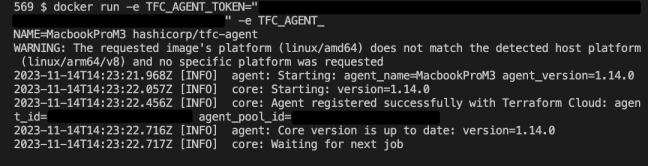
And it works fantastically:
 Dustin Dortch